ModeledNPCS
ModeledNPCS turns ModelEngine, BetterModel and MythicMobs models into interactive NPCs. Each NPC can talk, walk a patrol route, run commands, play particles, glow, escort a player, and change behaviour by time of day — all configurable in game, without touching a file.
See it in action
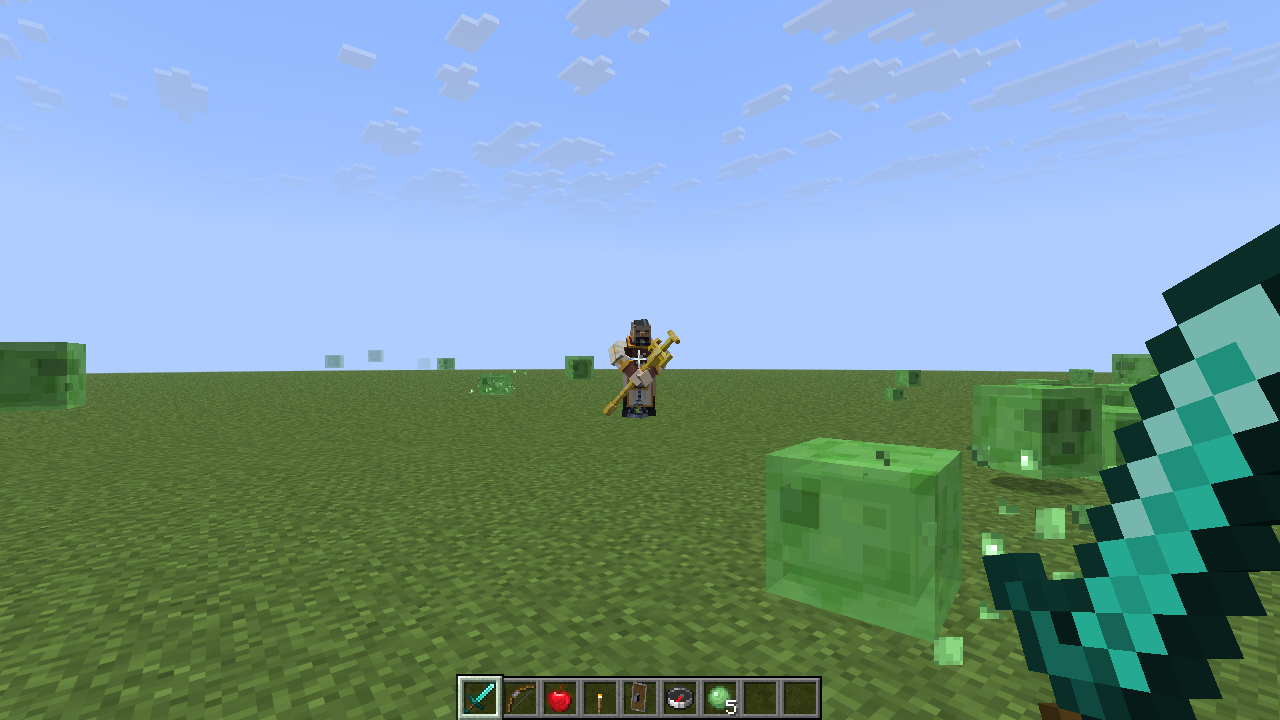
lr_acolyte) created with a single command.What you get
Installation
Requirements
| Plugin | Required | Notes |
|---|---|---|
| Paper 1.20 – 26.3 | Required | Paper 1.21.7+ is needed for PAPER dialogs and the DIALOG studio style. |
| PlaceholderAPI | Required | Hard dependency — the plugin will not enable without it. |
| packetevents | Required | Hard dependency. Used for packet-based rotation and NPC visibility. |
| ModelEngine | Optional | Needed for modelengine NPCs. |
| BetterModel | Optional | Needed for bettermodel NPCs. |
| MythicMobs | Optional | Needed for mythicmobs NPCs. |
| ProtocolLib | Optional | Smooth escort movement and PACKET auto-look mode. |
| WorldGuard | Optional | Region-aware NPC behaviour. |
| Quests / BetonQuest | Optional | Quest integration from dialogs. |
Install
Drop in the jar
Place ModeledNPCS-9.5.1.jar in plugins/ together with PlaceholderAPI and packetevents.
Start the server once
This generates plugins/ModeledNPCS/ with all configuration files and writes the dialog resource pack.
Add your models
Put your .bbmodel files in ModelEngine's blueprints/ (or BetterModel's models folder) and run /meg reload. The blueprint id is the model name you pass to /mnpc create.
Deliver the resource pack
Players need the model + dialog textures. See How the Pack Works — if you use CustomiZer, ItemsAdder or Nexo this is automatic.
Generated files
Quick Start
Create the NPC
Stand where you want it and run:
/mnpc create modelengine lr_acolyteThe console confirms the new id, e.g. Created ModelEngine NPC (ID: 2).
Give it a name
/mnpc name 2 &e&lFather LuciusOpen the editor
/mnpc edit 2Everything else — appearance, animations, behaviour, movement, interactions, effects and dialogue — is editable from here.
Make it walk
Stand at each waypoint and add it, then start patrolling:
/mnpcai 2 addpoint
/mnpcai 2 addpoint
/mnpcai 2 patrolGive it a dialog
Create plugins/ModeledNPCS/dialogs/village.yml and point it at the NPC id — see Dialog Trees. Then /mnpc reload.
<id> accepts the numeric NPC id shown by /mnpc list.Creating NPCs
/mnpc create <modelengine|bettermodel|mythicmobs> <name>| Type | <name> is | Requires |
|---|---|---|
modelengine | The blueprint id (the .bbmodel file name without extension) | ModelEngine |
bettermodel | The BetterModel model name | BetterModel |
mythicmobs | The MythicMobs mob id | MythicMobs |
The NPC spawns at your location and is assigned the next free id. Ids are capped by max_npc_ids in config.yml (default 1000).
.bbmodel to ModelEngine's blueprints/ folder, run /meg reload, then create the NPC.Removing
/mnpc remove <id>     # deletes the NPC permanently
/mnpc list # lists every NPC with its id, type and worldManaging NPCs
Position & pose
| Command | What it does |
|---|---|
/mnpc move <id> | Moves the NPC to where you are standing. |
/mnpc tp <id> | Teleports you to the NPC. |
/mnpc rotate <id> <degrees> <left|right> | Rotates the NPC by a number of degrees. |
/mnpc look <id> [off] | Turns the NPC to face you. off disables auto-look. |
/mnpc scale <id> <scale> | Sets the model render scale (e.g. 1.5). |
/mnpc static <id> | Toggles the NPC as static (never moves or is pushed). |
Visibility
/mnpc hide <id> <permission>   # only players with this permission see the NPC
/mnpc hide <id> remove          # clear the restriction
Click commands
Commands run when a player interacts with the NPC.
/mnpc addcmd <id> <player|console|sudo|bungee> <command>
/mnpc removecmd <id> <command>| Executor | Runs as |
|---|---|
player | The clicking player, with their own permissions. |
console | The server console. |
sudo | The player, but with elevated permission. |
bungee | Sent to the proxy (e.g. to switch server). |
npc.cooldowns.command_ms (default 3000 ms).Reloading
| Command | Reloads |
|---|---|
/mnpc reload | All configs, NPC data, dialogs and holograms. Applies renderer and GUI style changes live. |
/mnpc reloadname | Nametags only. |
/mnpc reloadanim | Animations. |
/mnpc reloadeffects | Effects. |
/mnpc cleanholograms [radius] | Removes stray hologram armor stands near you. |
Nametags & Holograms
/mnpc name <id> <custom name> [height]
/mnpc hidenametag <id>
/mnpc shownametag <id>
/mnpc resetnametag <id>
Names support & colour codes and MiniMessage, and PlaceholderAPI placeholders are resolved per viewer. The optional [height] is the vertical offset above the model.
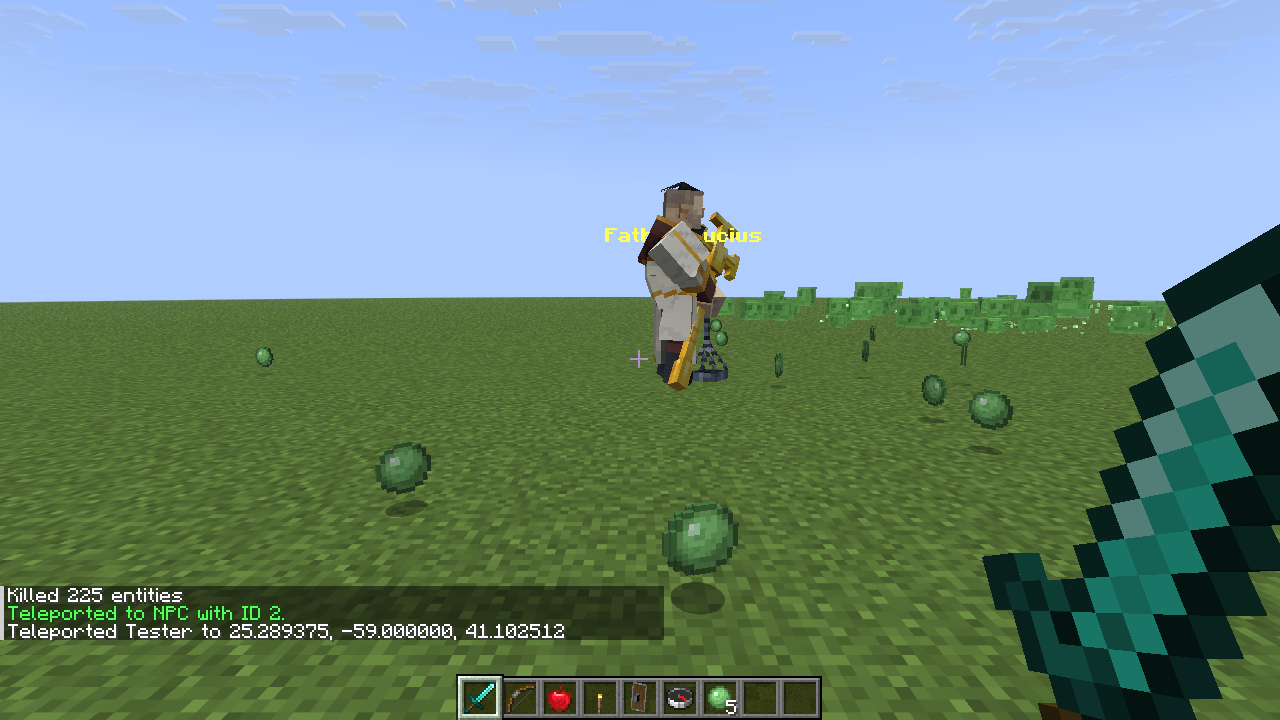
&e&lFather Lucius, mid-patrol.Animated holograms
Hologram text can cycle through frames. Enable hologram_animation.enabled in config.yml, then set frames through the Studio or the API (setNPCHologramFrames, setNPCHologramFrameInterval).
| Setting | Default | Meaning |
|---|---|---|
hologram-view-distance | 20 | Blocks at which hologram text is visible. |
hologram_animation.enabled | true | Enables frame cycling. |
holograms.debug_visibility | false | Verbose visibility logging. |
/mnpc cleanholograms 5, or in vanilla: /minecraft:kill @e[type=armor_stand,distance=..1].Hover System
When a player's crosshair lands on an NPC within range, the model and hologram scale up, a sound plays, an action-bar hint appears, and right-click interaction works from that distance — the player does not have to walk up to it.
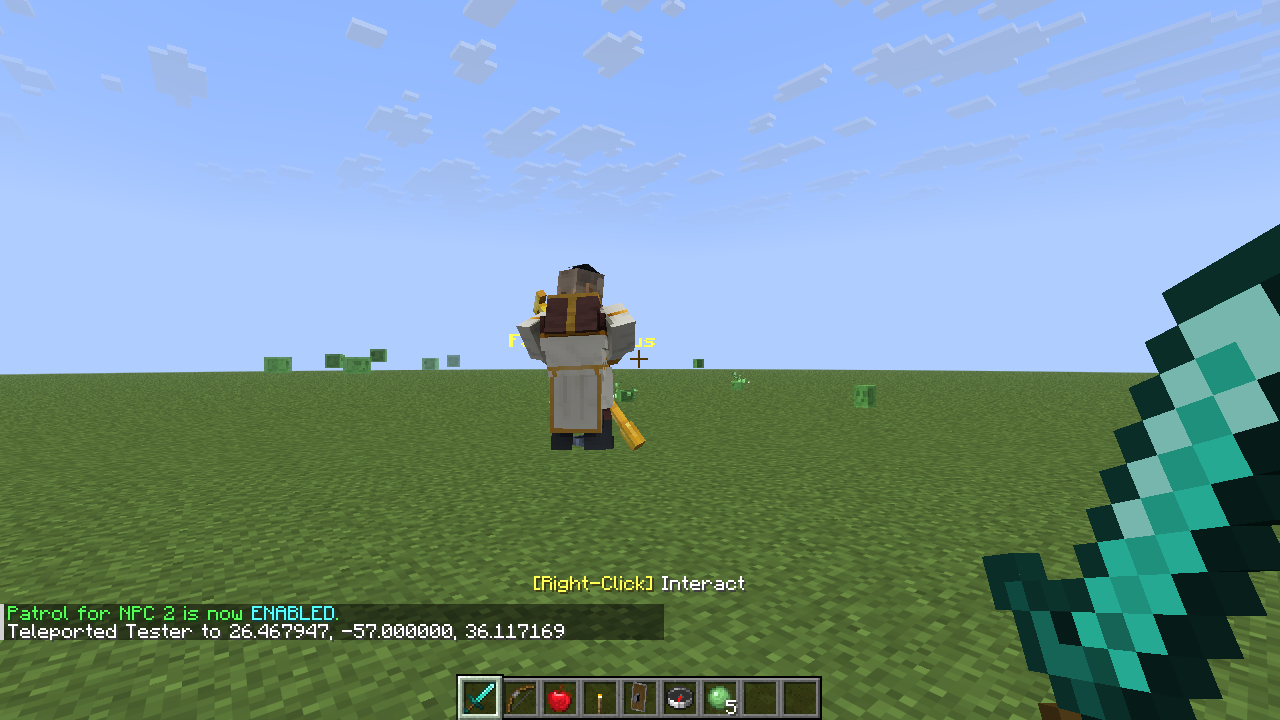
[Right-Click] Interact while hovering an NPC.npc:
hover:
enabled: true
range: 10.0 # how far away hover can trigger (blocks)
angle_deg: 15.0 # cone half-angle — how precisely to aim
scale: 1.2 # model scale while hovered
sound: UI_BUTTON_CLICK # any Bukkit Sound name
sound_volume: 0.6
sound_pitch: 1.4
scale_hologram: true
hologram_scale: 1.3
check_interval_ticks: 2 # lower = more responsive
hint_text: "&e[Right-Click] &fInteract" # blank to disablesetNPCHoverEnabled, setNPCHoverHint and setNPCHoverAnimation.States & Schedules
States
A state is a named mode an NPC is in. Dialogs, animations and effects can react to it. Enable with states.enabled: true; read and write with getNPCState / setNPCState.
Schedules
A schedule gives an NPC active hours. Outside them the NPC refuses interaction and shows the message from npc.schedule_inactive_message.
schedules:
  enabled: true

npc:
  schedule_inactive_message: "&cThis NPC is not available right now."
Set the window with setNPCSchedule(npcId, startHour, endHour), and check with isNPCActive(npcId). Hours are Minecraft world hours (0–23).
Greetings & player flags
| Setting | Default | Meaning |
|---|---|---|
greetings.enabled | true | NPCs greet players who approach. |
player_flags.enabled | true | Per-player interaction flags (e.g. "already talked"). |
player_flags.persistent | true | Saves flags to player_flags.yml across restarts. |
Admin Tool
/mnpc admintool give    # gives you the tool
/mnpc admintool info    # shows the current tool settings
AdminTool:
enabled: true
debug: false
item: BLAZE_ROD
permission: "" # empty = anyone with mnpc.admintool
name: "&6&lNPC Admin Tool"
lore:
- "&7Right-click an NPC to open"
- "&7the management GUI"
- ""
- "&eFor admins only"NPC Studio
/mnpc edit <id> # or /mnpc manage <id>, or /mnpcmanage <id>The Studio is the single place to configure an NPC. From the dashboard you reach every category:
| Page | What you configure |
|---|---|
| Appearance | Model, scale, nametag, hologram text and height. |
| Animations | Idle/walk/interact animations and ModelEngine states. |
| Behavior | Auto-look, static mode, states and schedules. |
| Movement | Routes, waypoints, patrol mode and speed. |
| Interactions | Click commands, cooldowns and view permission. |
| Effects | Looped and on-interact particles, potion effects, glow. |
| Dialogue | The dialog tree bound to this NPC. |
| Advanced | Internal ids, respawn, raw data. |
| NPC library | Browse and jump to any other NPC. |
Choosing a style
gui:
  style: CLASSIC     # CLASSIC | TEXTURED | DIALOG
  theme: arcane      # arcane, ember, forest
  border: full       # full, corners, none
  animations:
    enabled: true
    speed-ticks: 4   # 2..40 ticks between frames
    intensity: 1     # 0 = opening only; 1..3 = moving highlight
  sounds:
enabled: true/mnpc reload applies a change immediately — no restart.CLASSIC style
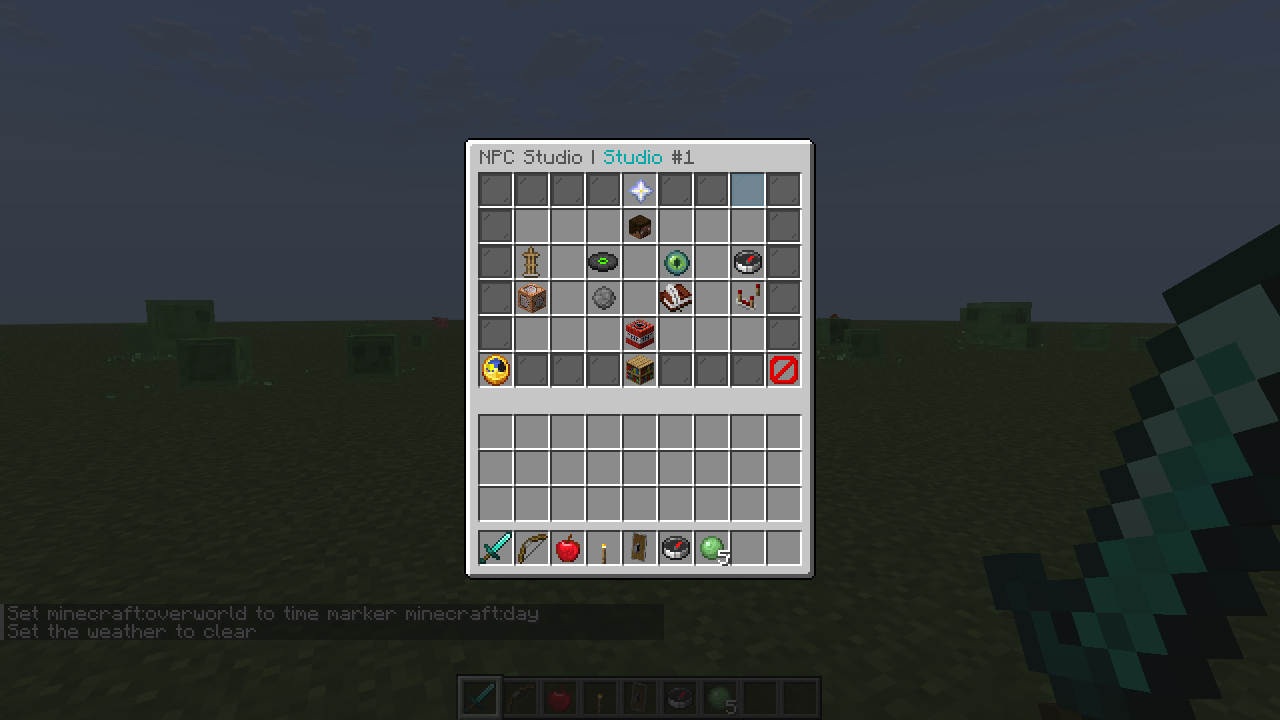
gui.style: CLASSIC — the NPC Studio dashboard.The default. Works on every client with no resource pack, and needs nothing from the player. Borders are animated glass panes; the theme and animation speed are configurable.
gui:
  style: CLASSIC
  theme: arcane        # arcane | ember | forest
border: full # full | corners | noneTEXTURED style
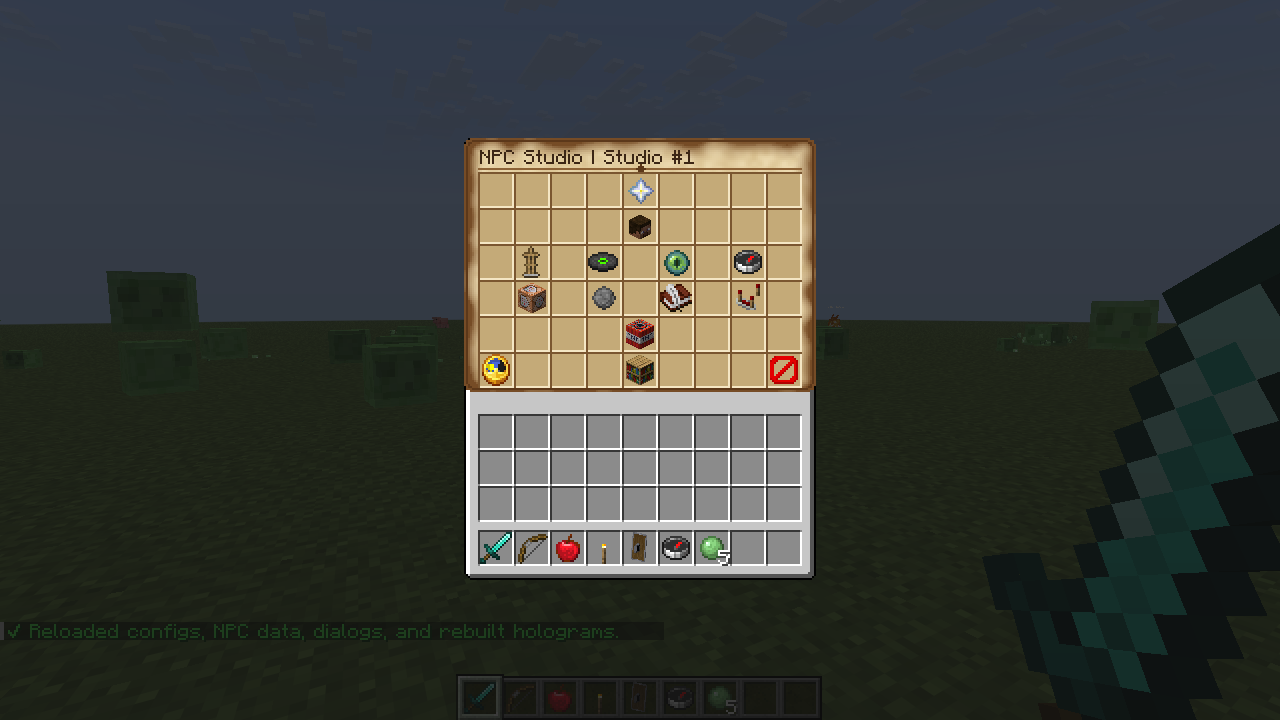
gui.style: TEXTURED — identical layout and clicks, parchment panel.Exactly the same menus and click behaviour as CLASSIC, but the chest background is replaced with a hand-drawn parchment panel with slot sockets, using a title glyph from the ModeledNPCS resource pack.
DIALOG style
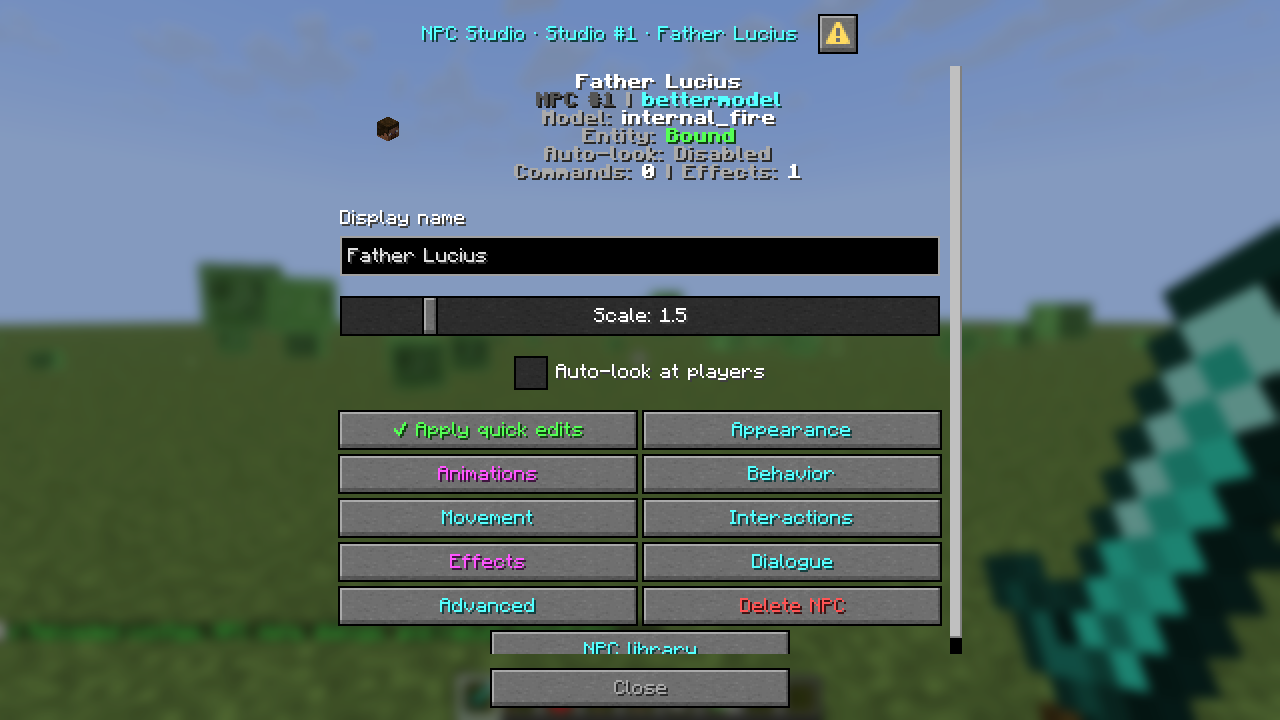
gui.style: DIALOG — native inputs, a live scale slider and a toggle.Every Studio screen becomes a native Minecraft dialog window. Clickable items become buttons, lore hints such as "Left +0.1 / Right -0.1" become their own buttons, and display-only items become icon rows.
The dashboard adds real inputs you cannot get from an inventory:
- Display name — a text field, edited in place
- Scale — a slider
- Auto-look at players — a checkbox
- Apply quick edits — saves all three at once and reports Saved
Dialog System
A dialog is a tree of nodes. Each node shows some lines and offers numbered options; each option can open another node, start a quest, run a command, start an escort, or end the conversation.
Dialog trees live in plugins/ModeledNPCS/dialogs/ — one or many .yml files, each holding one or more trees. Reload with /mnpc reload.
How display is chosen
- The tree's own
renderer:key, if present. - Otherwise
renderer.modeindialog_config.yml. - If that renderer is unavailable (e.g. PAPER on an old server), it falls back to CHAT.
Dialog Renderers
renderer:
  mode: PAPER      # PAPER | SHADER | CHAT
PAPER default
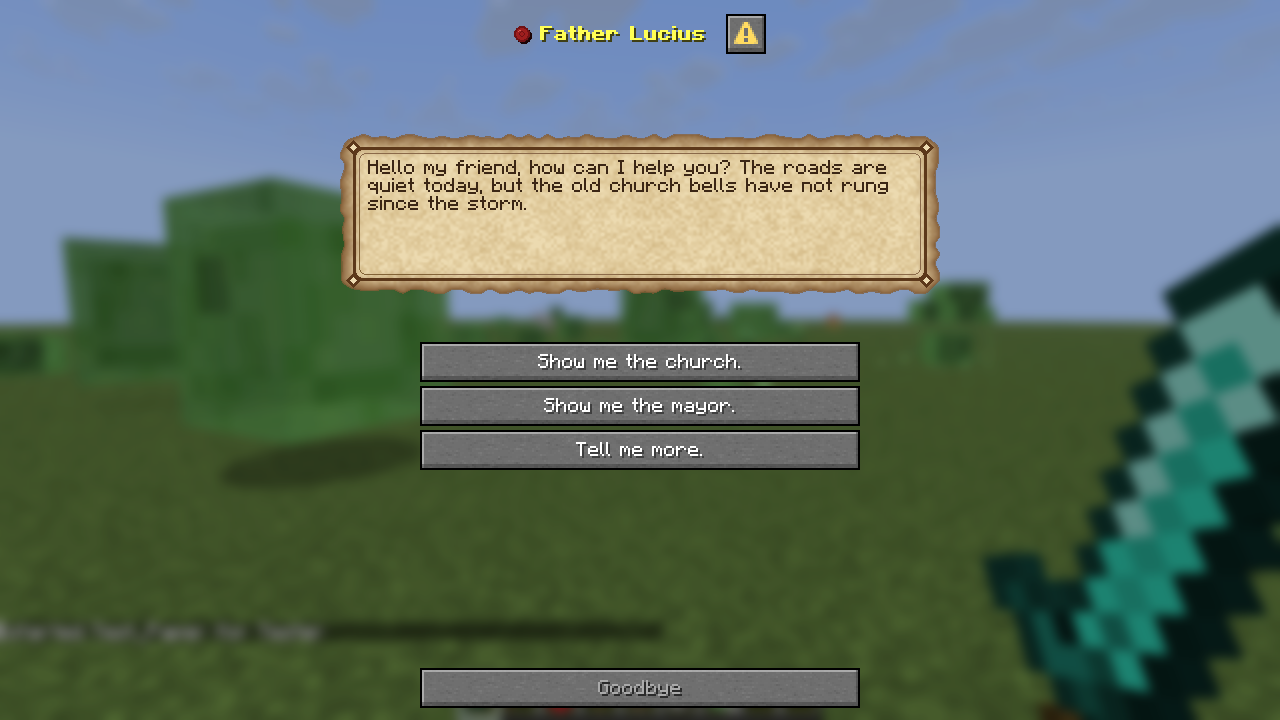
A native Minecraft dialog window with one button per answer plus a Goodbye exit button. It renders on every client, needs nothing from the player, and is the safest default.
  paper:
    use-pack-textures: true          # parchment panel (needs the pack)
    button-width: 220
close-button: '<gray>Goodbye</gray>'SHADER
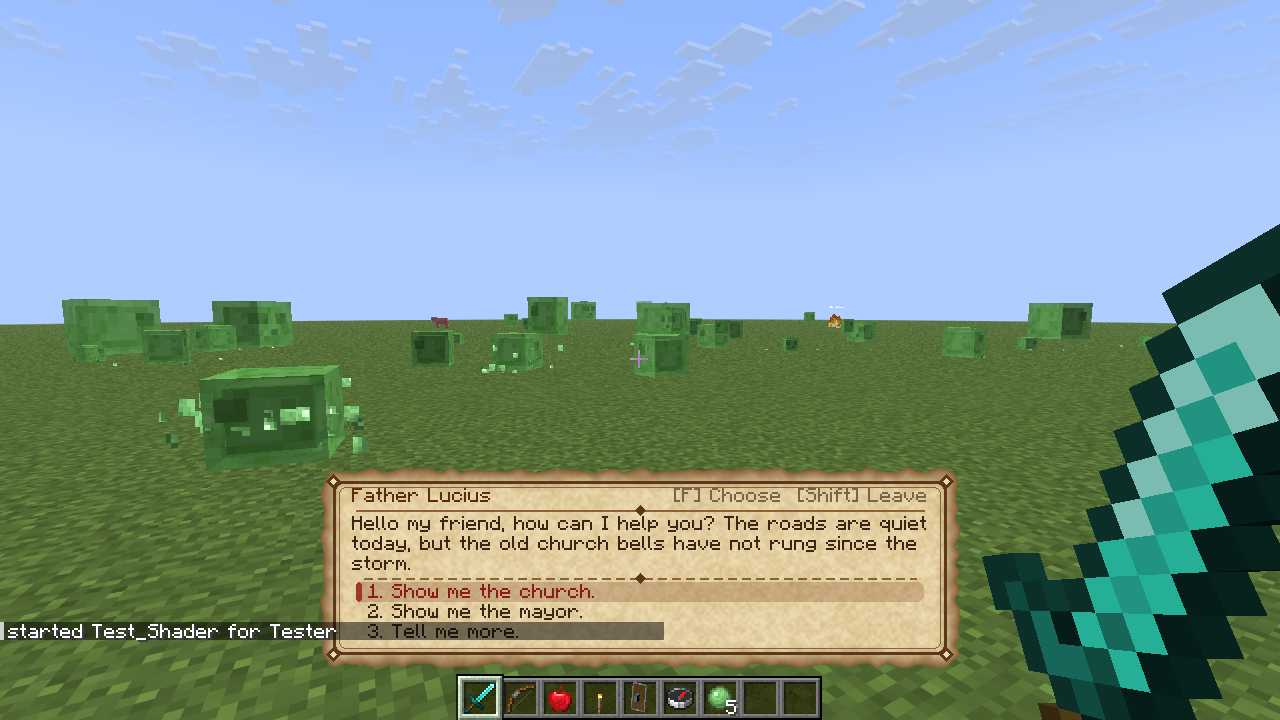
A parchment box above the hotbar, sent as action-bar text and positioned and inked by a core shader in the resource pack. The most immersive option — the player keeps full control of their character while talking.
- Mouse wheel or 1–9 — highlight an answer (the held item never changes)
- F — confirm, or turn the page on long text
- Shift — leave the conversation
- Typing the option number in chat also works
  shader:
    chat-fallback: false            # also print the dialog in chat
    hint-choose: '[F] Choose  [Shift] Leave'
hint-next: '[F] Continue [Shift] Leave'The parchment box is drawn by patching the vanilla core-shader pipeline. Sodium, Iris and OptiFine (and most other rendering mods) replace that pipeline with their own, so the patched text shader never runs. Those players see nothing at all above the hotbar — no error, no fallback, just a missing dialog. It is a silent failure, and it is easy to mistake for a broken plugin.
There are two ways to avoid it:
- Players use the vanilla (unmodded) client — the core shader then works normally.
- Or the server uses the PAPER dialog style, which renders on every client, modded or not. This is the default for exactly this reason.
If you want to keep SHADER for vanilla players, turn on
chat-fallback so modded players at least receive the dialog in chat.
CHAT
Plain chat lines; the player types the option number. No resource pack, no version requirement — the universal fallback.
Comparison
| PAPER | SHADER | CHAT | |
|---|---|---|---|
| Minimum server | Paper 1.21.7+ | Any | Any |
| Requires a vanilla (unmodded) client | No | Yes | No |
| Needs resource pack | Optional (nicer with) | Yes | No |
| Works with Sodium / Iris / OptiFine | ✅ | ❌ | ✅ |
| Player can move while talking | ❌ | ✅ | ✅ |
| Input | Buttons | Wheel / 1–9 / F | Type a number |
Dialog Trees
Village_Priest:                 # tree key — must be unique
  npc: 2                        # NPC id this tree belongs to
  questName: "LostBells"        # optional quest this dialog drives
  renderer: PAPER               # optional per-tree override
  displayName:
    - "&e&lFather Lucius"       # speaker name shown in the dialog
  dialog:
    Action: DIALOG
    Dialog:
      - "Hello my friend, how can I help you?"
      - "1) Show me the church."
      - "2) Tell me more."
    Options:
      "1":
        Action: CANCEL
      "2":
        Action: DIALOG
        Dialog:
          - "Long ago, pilgrims came from every corner of the realm..."
          - "1) I will help."
          - "2) Not today."
        Options:
          "1":
            Action: CANCEL
          "2":
            Action: CANCEL
Keys
| Key | Required | Meaning |
|---|---|---|
npc | Yes | The NPC id this tree is attached to. |
displayName | No | Speaker name. Supports colour codes and placeholders. |
questName | No | Links the dialog to a quest for status tracking. |
renderer | No | PAPER, SHADER or CHAT — overrides the global mode. |
dialog | Yes | The root node. |
Dialog | Yes | The lines shown. A line like 1) Text becomes option 1's label. |
Options | No | Map of option number → action. No options = a notice. |
Label | No | Explicit button label for an option, instead of the 1) ... line. |
Actions
| Action | Effect |
|---|---|
DIALOG | Opens a nested node (with its own Dialog and Options). |
CANCEL | Ends the conversation. |
COMMAND | Runs a command. |
QUEST | Assigns or advances the linked quest. |
ESCORT | Starts an escort to a destination. |
Quests & Placeholders
Quest status glow
NPCs can glow in a colour that reflects the player's progress on their quest. Configure in dialog_config.yml:
glow:
  enabled: true
  update-interval-ticks: 60

status:
  NOT_STARTED:
    chatColor: RED
    text: '&c&lNot Started'
  IN_PROGRESS:
    chatColor: YELLOW
    text: '&e&lIn Progress'
  COMPLETED:
    chatColor: GREEN
    text: '&a&lCOMPLETED'
Valid colours: BLACK, DARK_BLUE, DARK_GREEN, DARK_AQUA, DARK_RED, DARK_PURPLE, GOLD, GRAY, DARK_GRAY, BLUE, GREEN, AQUA, RED, LIGHT_PURPLE, YELLOW, WHITE.
PlaceholderAPI
| Placeholder | Returns |
|---|---|
%dialogstatus_<QuestName>_status% | The player's status text for that quest, using the status block above. |
Placeholders are also resolved inside dialog lines, nametags and hologram text, per viewer.
Third-party quests
Quests and BetonQuest are supported as soft dependencies — a dialog option can start or advance a quest in either plugin.
Routes & Patrol
patrol enabled.Building a route
Stand at each waypoint in order and add it, then start the patrol:
/mnpcai <id> addpoint      # adds a waypoint where you stand
/mnpcai <id> patrol        # toggles patrolling on/off
Each NPC has a default route, and can have more named routes:
/mnpcai <id> <routeId> addpoint
/mnpcai <id> <routeId> setroute position <First|1|2|3|4|5|6|Last>
Modes
npcai:
  default-mode: PATROL    # PATROL = back and forth, LOOP = cycle
default-speed: 0.25 # blocks per tick| Mode | Behaviour |
|---|---|
PATROL | Walks to the last point, then back along the same path. |
LOOP | Walks the points in a cycle, returning to the first. |
pathfindingDebug in config.yml for verbose route logging while you build a path.Arrival Actions
/mnpcai <id> [routeId] arrival info
/mnpcai <id> [routeId] arrival wait <seconds>
/mnpcai <id> [routeId] arrival animation <name|clear>
/mnpcai <id> [routeId] arrival dialog <treeKey|clear>
/mnpcai <id> [routeId] arrival permission <perm|clear>
/mnpcai <id> [routeId] arrival addcommand <command>
/mnpcai <id> [routeId] arrival clearcommands| Sub-command | What it sets |
|---|---|
info | Shows everything configured for this arrival. |
wait <seconds> | How long the NPC pauses at the point. |
animation <name> | Animation played on arrival. |
dialog <treeKey> | Dialog opened to nearby players on arrival. |
permission <perm> | Only players with this permission see the arrival dialog/commands. |
addcommand <command> | Adds a command to run on arrival. |
clearcommands | Removes all arrival commands. |
[routeId] to act on the NPC's default route.Escort
An escort is started from a dialog option (Action: ESCORT) or through the API with startEscort(npcId, player). The NPC leads the player to the destination and can play a dedicated animation on the way.
escort:
  smooth-clone-movement: true        # packet movement (needs ProtocolLib)
  move-hologram-during-escort: false
  hologram-refresh-interval: 2       # ticks
  force-hologram-refresh-on-end: true
hologram-height-boost: 0.5| Setting | Meaning |
|---|---|
smooth-clone-movement | true = smooth packet-based movement (ProtocolLib). false = teleport steps, choppier but dependency-free. |
move-hologram-during-escort | Whether the nametag follows the NPC while escorting. |
hologram-height-boost | Extra nametag height during an escort. |
Escort speed is per NPC (getEscortSpeed / setEscortSpeed), and the animation is set with setEscortAnimation(npcId, name).
Particles & Potions
/mnpc addeffect <id> particle <looped|oninteract> <PARTICLE_NAME> [yOffset]
/mnpc addeffect <id> potion <POTION_NAME> <seconds> [amplifier]
A compact colon form is also accepted:
particle:looped|oninteract:PARTICLE[:yOffset]
potion:NAME:seconds[:amplifier]| Type | When it plays |
|---|---|
looped | Continuously around the NPC. |
oninteract | Once, when a player interacts. |
potion | Applied to the player who interacts. |
Managing effects
/mnpc effect <clear|remove> <id>
/mnpc reloadeffects
/npceffects <npcId>                       # opens the effects editor GUI
/mnpceffects <id> <addeffect|removeeffect> ...
particles:
enabled: trueGlow
NPCs can glow in any chat colour, globally or for one player — commonly driven by quest status.
/glowtest <id> <color> # preview a glow colourThrough the API:
api.setNPCGlow(npcId, player, ChatColor.GREEN);   // one player
api.setNPCGlowForAll(npcId, ChatColor.GOLD);      // everyone
api.removeNPCGlow(npcId, player);
api.removeNPCGlowForAll(npcId);
api.toggleNPCGlow(npcId, player, true, ChatColor.AQUA);How the Pack Works
ModeledNPCS always writes plugins/ModeledNPCS/resourcepack/ModeledNPCS-Dialogs.zip. It contains the dialog parchment textures, the fonts, and the core shader used by SHADER mode.
Players need a resource pack for two separate reasons:
- Models — generated by ModelEngine / BetterModel. Without it, NPCs render as magenta/black blocks.
- Dialog + GUI textures — generated by ModeledNPCS. Needed for SHADER dialogs, the parchment PAPER panel, and the TEXTURED studio style.
| Your setup | What to do |
|---|---|
| CustomiZer, ItemsAdder or Nexo | Nothing — the pack is delivered automatically. See Pack Integrations. |
| No pack plugin | Turn on hosting and ModeledNPCS will merge and serve everything. |
| Oraxen or your own server pack | Leave hosting off and add ModeledNPCS-Dialogs.zip to your pack yourself. |
resource-pack:
export: true # always write ModeledNPCS-Dialogs.zipHosting & Merging
resource-pack:
  hosting:
    enabled: true
    public-address: ''      # domain/IP players use; empty = server-ip
    port: 8163
    bind: 0.0.0.0
    required: false
    prompt: 'This server uses a resource pack for NPC models and dialogs.'
    resend-on-update: true
  merge:
    modelengine: true
    bettermodel: true
    extra: []               # extra zips/folders, relative to plugins/ModeledNPCS
    check-interval: 5       # seconds between checks for regenerated packs
With hosting on, ModeledNPCS:
- Merges the ModelEngine and BetterModel packs with its own into
ModeledNPCS-Merged.zip. - Serves it from a built-in web server and sends it to players on join.
- Watches the source packs — when they regenerate (new models,
/meg reload,/bettermodel reload) the merged pack is rebuilt and re-sent.
Merge rules
pack.mcmeta— format ranges are widened and all overlays are kept- Fonts, atlases, lang files and
sounds.jsonare combined - Any other conflicting file keeps the later pack, and a warning is logged
- Zips use fixed timestamps, so unchanged content keeps its SHA-1 and is not re-downloaded
public-address must be reachable by your players. On a hosted machine this is your server's public domain or IP, and the port must be open.hosting.enabled: false when you use CustomiZer, ItemsAdder or Nexo — they already merge the model packs, and two systems sending packs will fight.Pack Integrations
resource-pack:
  integrations:
    customizer: true
    itemsadder: true
    nexo: true
    rebuild: true     # run their rebuild command when the pack changes
shader: true # include the dialog core shader (SHADER mode only)| Plugin | Where the pack goes | Rebuild command |
|---|---|---|
| CustomiZer | Added to resourcepack.merge-packs (only when CustomiZer's resourcepack.enabled is true) | /zpack zip |
| ItemsAdder | plugins/ItemsAdder/contents/modelednpcs/resourcepack | /iazip |
| Nexo | plugins/Nexo/pack/external_packs/ModeledNPCS.zip | /nexo reload pack |
ModeledNPCS declares loadbefore for all three, so their own startup build already contains the pack — no extra rebuild on boot. When the pack changes later (for example after /mnpc reload), the rebuild command runs automatically.
pack.mcmeta, overlays are flattened: the shader variant matching your server's Minecraft version is placed at the pack root.config.yml
General
| Key | Default | Meaning |
|---|---|---|
max_npc_ids | 1000 | Highest NPC id that can be allocated. |
debug | false | General debug logging. |
pathfindingDebug | false | Escort/pathfinding debug (very verbose). |
worldguard_debug | false | WorldGuard region debug. |
pathhologramdebug | false | Path hologram debug. |
serializeDebug | false | Serialization debug. |
hologram-view-distance | 20 | Distance at which holograms are visible. |
useJsonStorage | false | Store NPCs as JSON instead of SQLite. |
useBackupFile | true | Keep a backup copy of NPC data. |
limit.<mob> | adventurerNPC: 3 | Per-mob spawn limits. |
npc.autoRegisterOrphanedNPCs | false | Re-adopt NPC entities with no data entry. |
Interaction
npc:
  interaction:
    left:  true
    right: true
    left_fallback:
      enabled: true
      range: 5.5        # blocks
      angle_deg: 30.0   # cone half-angle
    right_fallback:
      enabled: true
      range: 5.5
      angle_deg: 30.0
  cooldowns:
    command_ms: 3000      # between command runs
    interaction_ms: 500   # between interactions
    click_dedup_ms: 250   # ignores duplicate click packets
The fallback blocks catch clicks that hit air or a block near the NPC — useful because large models often have an offset hitbox.
Feature toggles
| Key | Default | Meaning |
|---|---|---|
particles.enabled | true | NPC particle effects. |
greetings.enabled | true | Greeting messages. |
states.enabled | true | NPC state system. |
schedules.enabled | true | Time-of-day schedules. |
player_flags.enabled | true | Per-player interaction flags. |
player_flags.persistent | true | Save flags between restarts. |
hologram_animation.enabled | true | Animated hologram frames. |
antiPiracy.enabled | false | Anti-piracy checks. |
Auto-look
autolook:
  mode: PACKET             # PACKET (ProtocolLib, smooth) or BUKKIT (teleport)
  watchdog-enabled: false  # forces pitch back to 0 if another plugin rotates NPCs
  period-ticks: 2
  max-step-degrees: 25.0   # higher = turns faster
  max-distance: 100.0
  default-yaw-offset: 0.0
  modelengine-yaw-offsets:
dummy_model: -90.0 # per-blueprint correctionmodelengine-yaw-offsets instead of rotating every NPC by hand.Other sections
hover, escort, AdminTool, npcai, gui and resource-pack are documented in their own pages:
Hover,
Escort,
Admin Tool,
Routes,
Studio,
Resource Pack.
dialog_config.yml
glow:
  enabled: true
  update-interval-ticks: 60

status:
  NOT_STARTED: { chatColor: RED,    text: '&c&lNot Started' }
  IN_PROGRESS: { chatColor: YELLOW, text: '&e&lIn Progress' }
  COMPLETED:   { chatColor: GREEN,  text: '&a&lCOMPLETED' }

msg:
  ALREADY_STARTED_QUEST: '<red>You''ve already started this quest.</red>'
  ALREADY_COMPLETED: '<red>You''ve already completed this quest.</red>'

renderer:
  mode: PAPER
  paper:
    use-pack-textures: true
    button-width: 220
    close-button: '<gray>Goodbye</gray>'
  shader:
    refresh-ticks: 20        # deprecated / ignored
    chat-fallback: false
    hint-choose: '[F] Choose  [Shift] Leave'
hint-next: '[F] Continue [Shift] Leave'| Key | Default | Meaning |
|---|---|---|
renderer.mode | PAPER | Default dialog style for all trees. |
paper.use-pack-textures | true | Draw the parchment panel (needs the pack). |
paper.button-width | 220 | Button width in pixels. |
paper.close-button | Goodbye | Label of the exit button. |
shader.chat-fallback | false | Also print the dialog in chat — the fallback for Sodium / Iris / OptiFine players. |
shader.hint-choose / hint-next | — | Key hints in the box corner. |
shader.refresh-ticks | 20 | Ignored. The box is re-sent every tick so it never fades or flickers. Kept so old configs still load. |
mode to SHADER, read the Sodium / Iris / OptiFine warning — those players will see no dialog at all.All Commands
/mnpc
| Command | Description |
|---|---|
/mnpc create <modelengine|bettermodel|mythicmobs> <name> | Creates an NPC at your location. |
/mnpc remove <id> | Deletes an NPC. |
/mnpc list | Lists every NPC. |
/mnpc edit <id> | Opens the NPC Studio. |
/mnpc manage <id> | Alias of edit. |
/mnpc move <id> | Moves the NPC to you. |
/mnpc tp <id> | Teleports you to the NPC. |
/mnpc look <id> [off] | Faces you / disables auto-look. |
/mnpc rotate <id> <degrees> <left|right> | Rotates the NPC. |
/mnpc scale <id> <scale> | Sets the model scale. |
/mnpc static <id> | Toggles static mode. |
/mnpc name <id> <custom name> [height] | Sets the display name. |
/mnpc hidenametag <id> | Hides the nametag. |
/mnpc shownametag <id> | Shows the nametag. |
/mnpc resetnametag <id> | Resets the nametag to default. |
/mnpc hide <id> <permission|remove> | Restricts who can see the NPC. |
/mnpc addcmd <id> <player|console|sudo|bungee> <command> | Adds a click command. |
/mnpc removecmd <id> <command> | Removes a click command. |
/mnpc addeffect <id> <particle|potion> ... | Adds an effect. |
/mnpc effect <clear|remove> <id> | Clears or removes effects. |
/mnpc admintool <give|info> | Gives the admin wand / shows its settings. |
/mnpc cleanholograms [radius] | Removes stray holograms. |
/mnpc reload | Reloads configs, NPCs, dialogs and holograms. |
/mnpc reloadname | Reloads nametags. |
/mnpc reloadanim · reloadanimations | Reloads animations. |
/mnpc reloadeffects | Reloads effects. |
/mnpc debug | Prints debug information. |
/mnpcai
| Command | Description |
|---|---|
/mnpcai <id> addpoint | Adds a waypoint where you stand. |
/mnpcai <id> patrol | Toggles patrolling. |
/mnpcai <id> setroute position <First|1..6|Last> | Sets a specific waypoint slot. |
/mnpcai <id> [routeId] arrival info | Shows arrival settings. |
/mnpcai <id> [routeId] arrival wait <seconds> | Pause length at the point. |
/mnpcai <id> [routeId] arrival animation <name|clear> | Arrival animation. |
/mnpcai <id> [routeId] arrival dialog <treeKey|clear> | Dialog opened on arrival. |
/mnpcai <id> [routeId] arrival permission <perm|clear> | Permission gate for the arrival. |
/mnpcai <id> [routeId] arrival addcommand <command> | Adds an arrival command. |
/mnpcai <id> [routeId] arrival clearcommands | Clears arrival commands. |
Other commands
| Command | Description | Permission |
|---|---|---|
/mnpcmanage <id> | Opens the manager menu for an NPC. | modelednpcs.manage |
/npceffects <npcId> | Opens the effects editor. | modelednpcs.effects |
/mnpceffects <id> <addeffect|removeeffect> ... | Triggers/edits NPC effects. | mnpceffects.use |
/meganim | Opens the ModelEngine animation editor. | modelednpcs.meganim |
/glowtest <id> <color> | Previews a glow colour. | modelednpcs.admin |
Permissions
| Node | Default | Grants |
|---|---|---|
mnpc.use | op | Use of the /mnpc commands. |
modelednpcs.admin | op | Admin commands: /mnpcai, /glowtest. |
modelednpcs.manage | op | /mnpcmanage — the NPC manager menu. |
modelednpcs.effects | op | /npceffects — the effects editor. |
modelednpcs.meganim | op | /meganim — the animation editor. |
mnpceffects.use | op | /mnpceffects. |
mnpc.admintool | op | Use of the NPC Admin Tool wand. |
/mnpc hide <id> <permission>. Any node you like can be used there.mnpc.use and mnpc.admintool without full modelednpcs.admin so they can place and edit NPCs but not change routes.Developer API
| API artifact | fr.elias:ModeledNPCs-API:8.1 |
|---|---|
| Maven releases | https://maven.oreostudios.fr/releases |
| Java | 17 bytecode — compatible with Java 17 and newer |
| Server API | Bukkit/Paper |
| Source | OreoStudios/ModeledNPCS-API |
Install with Maven
<repositories>
    <repository>
        <id>oreostudios-releases</id>
        <url>https://maven.oreostudios.fr/releases</url>
    </repository>
</repositories>

<dependencies>
    <dependency>
        <groupId>fr.elias</groupId>
        <artifactId>ModeledNPCs-API</artifactId>
        <version>8.1</version>
        <scope>provided</scope>
    </dependency>
</dependencies>
Install with Gradle
repositories {
    maven("https://maven.oreostudios.fr/releases")
}

dependencies {
    compileOnly("fr.elias:ModeledNPCs-API:8.1")
}provided / compileOnly — never bundle or shade its classes into your plugin.Declare the runtime dependency
Declare ModeledNPCS in your plugin.yml. Bukkit then loads it first, so the API is registered before your plugin enables.
name: ExampleIntegration
version: 1.0.0
main: com.example.integration.ExampleIntegrationPlugin
api-version: '1.21'
depend: [ModeledNPCS]
Get the API
ModeledNPCsAPI.get() returns the registered service, or null if ModeledNPCS has not enabled. With depend: [ModeledNPCS], check once in onEnable and keep the reference:
package com.example.integration;

import fr.elias.npcs.api.ModeledNPCsAPI;
import org.bukkit.plugin.java.JavaPlugin;

public final class ExampleIntegrationPlugin extends JavaPlugin {
    private ModeledNPCsAPI modeledNPCs;

    @Override
    public void onEnable() {
        modeledNPCs = ModeledNPCsAPI.get();
        if (modeledNPCs == null) {
            getLogger().severe("ModeledNPCS did not register its API");
            getServer().getPluginManager().disablePlugin(this);
            return;
        }
        getLogger().info("Connected to ModeledNPCS API");
    }
}ModeledNPCsProvider remains available for code using the legacy IModeledNPCsAPI. New integrations should use ModeledNPCsAPI.Threading
Return values
| Method | Returns when it fails / is unset |
|---|---|
getNPCById and other lookups | null when the id is unknown. |
getEntityByNPCId | null while the NPC has no spawned entity. |
getRoute | null if that route does not exist. |
createNPC | -1 for an unsupported type or a failed creation. |
isNPCActive | true for NPCs with no configured schedule. |
getQuestStatus | null when no installed quest adapter recognises the quest. |
getTraderManager | null if the trader service is unavailable. |
getNPCHoverHint / getNPCHoverAnimation | Empty string when no per-NPC value is configured. |
Returned maps and lists are snapshots unless a method explicitly returns a live handle (see INPCRoute). INPCData is mutable — prefer the matching API operation, and after changing data directly call the relevant update or persistence operation.
Version compatibility
API Methods
ModeledNPCsAPI, by area.Reference by area
| Area | Methods |
|---|---|
| Lookup | getNPCById, getEntityByNPCId, getAllNPCIds, getAllNPCs |
| Display & nametag | getNPCDisplayName, getNPCDisplayNameRaw, getNPCDisplayNameFor, setNPCDisplayName, hideNPCNametag, showNPCNametag, isNPCNametagHidden, reapplyNPCName, reapplyAllNPCNames |
| Location & lifecycle | getNPCLocation, moveNPC, createNPC, deleteNPC, updateNPC, respawnNPC |
| Visibility & commands | canPlayerViewNPC, getNPCCommands, addCommandToNPC, runNPCCommands |
| Effects & auto-look | getNPCEffects, playInteractEffects, restartLoopedEffect, enableAutoLook, disableAutoLook |
| Routes | addRouteWaypoint, clearRoute, getOrCreateRoute, getRoute, setRouteMode, setRouteSpeed · handle: INPCRoute |
| Escort | startEscort, stopEscort, setEscortAnimation, getEscortAnimation · options: EscortOptions |
| Trader & quests | openTraderGUI, getTraderManager, assignQuest, getQuestStatus · types: TraderAPI, QuestStatus |
| Dialogs | openDialog, isLuxDialoguesAvailable, triggerLuxDialogue, isPlayerInLuxDialogue, setNPCLuxDialogue, getNPCLuxDialogue, setNPCLuxFirstPage, getNPCLuxFirstPage |
| Glow | setNPCGlow, removeNPCGlow, setNPCGlowForAll, removeNPCGlowForAll, toggleNPCGlow |
| Hover | getHoveredNPCId, isPlayerHoveringNPC, setNPCHoverEnabled, isNPCHoverEnabled, setNPCHoverHint, getNPCHoverHint, setNPCHoverAnimation, getNPCHoverAnimation |
| State & schedule | setNPCState, getNPCState, isNPCActive, setNPCSchedule, getNPCScheduleStart, getNPCScheduleEnd |
| Hologram animation | setNPCHologramFrames, getNPCHologramFrames, setNPCHologramFrameInterval, getNPCHologramFrameInterval |
| Model integrations | applyModelEngineModel, respawnModelEngineNPC, spawnMythicMobsNPC, spawnMythicMobsNPCFull, updateMythicMobName, respawnMythicMobNPC |
Data types live in fr.elias.npcs.data, events in fr.elias.npcs.events, and the legacy IModeledNPCsAPI in fr.elias.npcs.
Listing and inspecting
for (int id : modeledNPCs.getAllNPCIds()) {
    getLogger().info("NPC " + id + ": " + modeledNPCs.getNPCDisplayName(id));
}

var npc = modeledNPCs.getNPCById(42);
if (npc != null) {
    getLogger().info(npc.getName() + " uses model " + npc.getModelId());
}
Creating and moving
var target = player.getLocation().clone();
modeledNPCs.moveNPC(42, target);
modeledNPCs.respawnNPC(42);

int created = modeledNPCs.createNPC("modelengine", "merchant_blueprint", target);
if (created == -1) {
    player.sendMessage("NPC could not be created; check its type and integration.");
}modelengine and mythicmobs. The matching plugin must be installed, and name is interpreted by that integration.Names, commands and effects
modeledNPCs.setNPCDisplayName(42, "&6Town Guide", 2.2);
modeledNPCs.hideNPCNametag(42);
modeledNPCs.showNPCNametag(42);

modeledNPCs.addCommandToNPC(42, "player: warp town");
modeledNPCs.runNPCCommands(42, player);
modeledNPCs.playInteractEffects(42, player);
modeledNPCs.restartLoopedEffect(42);
getNPCDisplayNameRaw keeps the configured formatting, while getNPCDisplayNameFor(player, id) applies PlaceholderAPI when available and returns a legacy formatted string.
Routes
getOrCreateRoute returns a live handle — waypoint, mode and speed changes save through ModeledNPCS. getRoute only looks up and returns null when the route does not exist.
import fr.elias.npcs.data.INPCRoute;

INPCRoute route = modeledNPCs.getOrCreateRoute(42, "market-tour");
route.addWaypoint(player.getLocation().clone());
route.addWaypoint(secondStop);
route.setMode("LOOP");   // or "PATROL"
route.setSpeed(0.25);     // finite, positive blocks per tick

// Convenience setters for the default route:
modeledNPCs.setRouteMode(42, fr.elias.npcs.data.RouteMode.PATROL);
modeledNPCs.setRouteSpeed(42, 0.25);

INPCRoute existing = modeledNPCs.getRoute(42, "market-tour");
if (existing != null) {
    var waypoints = existing.getWaypoints();  // detached copies, unmodifiable list
    existing.clearWaypoints();
}
INPCRoute | Returns / does |
|---|---|
getNpcId() · getRouteId() | Owning NPC and route id. |
getWaypoints() | Unmodifiable list of detached Location copies. |
addWaypoint(Location) | Appends a waypoint. The world must be loaded. |
clearWaypoints() | Removes them all. |
getMode() · setMode(String) | "PATROL" or "LOOP". |
getSpeed() · setSpeed(double) | Blocks per tick. |
Escorts
modeledNPCs.startEscort(42, player);          // default route
modeledNPCs.stopEscort(player.getUniqueId());
For a named route and arrival behaviour, use the immutable EscortOptions record:
import fr.elias.npcs.data.EscortOptions;
import java.util.List;
import java.util.Map;

var options = new EscortOptions(
    "market-tour",                                  // route id; null = default route
    List.of("We made it!"),                          // arrival dialog lines
    "market_arrival",                               // arrival dialog tree key, or null
    10,                                              // arrival timeout in seconds
    "Are you still with me?",                        // timeout message, or null
    List.of("console:say {player} arrived"),         // arrival commands
    Map.of("first", new EscortOptions.WalkingDialogEntry(
        List.of("Follow me.", "The market is close."),
        8                                            // seconds between lines
    ))
);
modeledNPCs.startEscort(42, player, options);
Pass empty lists or a null route/tree/message to omit optional settings. Walking-dialog keys keep insertion order, timeouts must be ≥ 0, and walking-dialog intervals must be positive.
Traders and quests
import fr.elias.npcs.api.TraderAPI;
import fr.elias.npcs.data.QuestStatus;

TraderAPI traders = modeledNPCs.getTraderManager();
if (traders != null && traders.hasTrader(42)) {
    String displayName = traders.getTraderDisplayName(42);
    traders.openTrade(player, 42);
}
modeledNPCs.openTraderGUI(player, 42);   // convenience

modeledNPCs.assignQuest(player, "intro");
QuestStatus status = modeledNPCs.getQuestStatus(player, "intro");
TraderAPI also exposes reload, getTraderHologramOffset and getDefaultHologramOffset; an unconfigured offset or missing display name returns null. QuestStatus is NOT_STARTED, IN_PROGRESS or COMPLETED, and null when no adapter recognises the quest.
Dialogs and LuxDialogues
modeledNPCs.openDialog(player, 42);

if (modeledNPCs.isLuxDialoguesAvailable()) {
    modeledNPCs.setNPCLuxDialogue(42, "welcome");
    modeledNPCs.setNPCLuxFirstPage(42, "1");
    boolean opened = modeledNPCs.triggerLuxDialogue(player, 42);
    boolean busy   = modeledNPCs.isPlayerInLuxDialogue(player);
}
triggerLuxDialogue returns false if no matching dialogue is configured or the integration cannot start it.
Glow
modeledNPCs.setNPCGlow(42, player, org.bukkit.ChatColor.GOLD);
modeledNPCs.removeNPCGlow(42, player);
modeledNPCs.setNPCGlowForAll(42, org.bukkit.ChatColor.GREEN);
modeledNPCs.toggleNPCGlow(42, player, false, org.bukkit.ChatColor.WHITE);Hover, state, schedule and holograms
modeledNPCs.setNPCHoverEnabled(42, true);
modeledNPCs.setNPCHoverHint(42, "&eTalk to me");
modeledNPCs.setNPCHoverAnimation(42, "wave");
int hoveredId = modeledNPCs.getHoveredNPCId(player);   // -1 if none

modeledNPCs.setNPCState(42, "busy");
String state = modeledNPCs.getNPCState(42);

modeledNPCs.setNPCSchedule(42, 8, 18);   // in-game hours 0..23; (-1, -1) disables
boolean activeNow = modeledNPCs.isNPCActive(42);

modeledNPCs.setNPCHologramFrames(42, List.of("&aOpen", "&eWelcome"));
modeledNPCs.setNPCHologramFrameInterval(42, 20);   // ticks
INPCData
int getId();  String getName();  String getType();
String getCustomName();        void setCustomName(String n);
String getCustomDisplayName(); void setCustomDisplayName(String n);
Location getLocation();        void setLocation(Location l);
List<String> getCommands();    void setCommands(List<String> c);
void addCommand(String c);     void removeCommand(String c);
UUID getEntityUuid();          void setEntityUuid(UUID u);
UUID getInternalUUID();        void setInternalUUID(UUID u);
String getViewPermission();    void setViewPermission(String p);
boolean hasViewPermission(Player p);   boolean isHidden();
boolean isAutoLook();          void setAutoLook(boolean v);
double getHologramHeight();    void setHologramHeight(double h);
double getEscortSpeed();       void setEscortSpeed(double s);
String getLoopedAnimation();   void setLoopedAnimation(String a);
String getInteractAnimation(); void setInteractAnimation(String a);
String getEscortAnimation();   void setEscortAnimation(String a);
int getInteractCooldownSeconds();  void setInteractCooldownSeconds(int s);
String getModelId();           void setModelId(String id);
List<? extends INPCEffect> getEffects();
int getLoopedEffectTaskId(); void setLoopedEffectTaskId(int id);Events
fr.elias.npcs.events.| Event | Fires | Cancelling |
|---|---|---|
NPCInteractEvent | A player interacts with an NPC. | Cancels the interaction (dialog and commands). |
NPCHoverEvent | A player's aim enters or leaves an NPC. | On ENTER, suppresses that transition's scale, sound and hint. Later hover checks still run. |
NPCStateChangeEvent | An NPC's state is about to change. | Prevents the new state being applied. |
import fr.elias.npcs.events.NPCInteractEvent;
import fr.elias.npcs.events.NPCHoverEvent;
import fr.elias.npcs.events.NPCStateChangeEvent;
import org.bukkit.event.EventHandler;
import org.bukkit.event.Listener;

public final class NpcListener implements Listener {

    @EventHandler
    public void onNpcInteract(NPCInteractEvent event) {
        var player = event.getPlayer();
        var npc    = event.getNPCData();

        if (npc.getId() == 7 && !player.hasPermission("myplugin.vip")) {
            player.sendMessage("The guard ignores you.");
            event.setCancelled(true);
            return;
        }

        switch (event.getInteractionType()) {
            case LEFT_CLICK        -> { }
            case RIGHT_CLICK       -> player.sendMessage("Hello!");
            case SHIFT_LEFT_CLICK  -> { }
            case SHIFT_RIGHT_CLICK -> player.sendMessage("Secret menu");
        }
    }

    @EventHandler
    public void onNpcHover(NPCHoverEvent event) {
        if (event.getAction() == NPCHoverEvent.HoverAction.ENTER) {
            // event.setCancelled(true) suppresses this hover presentation
        }
    }

    @EventHandler
    public void onNpcStateChange(NPCStateChangeEvent event) {
        if ("maintenance".equals(event.getNewState())) {
            event.setCancelled(true);
        }
    }
}
NPCInteractEvent
| Member | Returns |
|---|---|
getPlayer() | The interacting Player. |
getNPCData() | INPCData of the NPC. |
getInteractionType() | LEFT_CLICK, RIGHT_CLICK, SHIFT_LEFT_CLICK or SHIFT_RIGHT_CLICK. |
isCancelled() / setCancelled(boolean) | Cancellation state. |
NPCHoverEvent
Provides the player, the NPC and getAction() — HoverAction.ENTER or HoverAction.LEAVE.
NPCStateChangeEvent
Provides the old and new state. Cancelling keeps the NPC in its current state.
getServer().getPluginManager().registerEvents(new NpcListener(), this);